The Definitive Guide to Vibe Coding: How to Build Full-Stack Apps with AI in 2026
Table of Contents
- 1. What is Vibe Coding? (And What It Isn't)
- 2. The 5-Step Vibe Coding Engineering Loop
- 3. The 2026 Vibe Coding Ecosystem & Tool Matrix
- 4. End-to-End Walkthrough: Building "FocusPulse" Live
- 5. The 4 Cardinal Sins That Break Vibe Coded Projects
- 6. The Vibe Coder's Pre-Flight Checklist
- 7. Frequently Asked Questions
1. What is Vibe Coding? (And What It Isn't)
When AI researcher Andrej Karpathy famously tweeted about “vibe coding”—sitting back, dictating product vision, and letting AI agents generate mountains of syntax while he simply directed the flow—the internet divided into two camps.
Traditional software purists mocked it as "careless code slinging without discipline." Meanwhile, solo creators, indie hackers, and live streamers were shipping fully functional, monetized SaaS products in a single weekend.
The True Definition: Vibe coding is not sloppy development. It is high-velocity declarative software engineering. You act as the Creative Director, Product Architect, and Lead QA Inspector, while autonomous LLM agents operate as your tireless junior engineers.
You do not write for loops, fiddle with CSS flexbox calculations, or manually debug React dependency arrays. You articulate intent, dictate user flows, enforce hard constraints, and steer the AI whenever edge cases emerge.
Whether you are an absolute beginner who has never touched a terminal or a seasoned engineer building side projects on a live Twitch stream, vibe coding changes software from an exercise in syntax memorization into an exercise in product clarity.
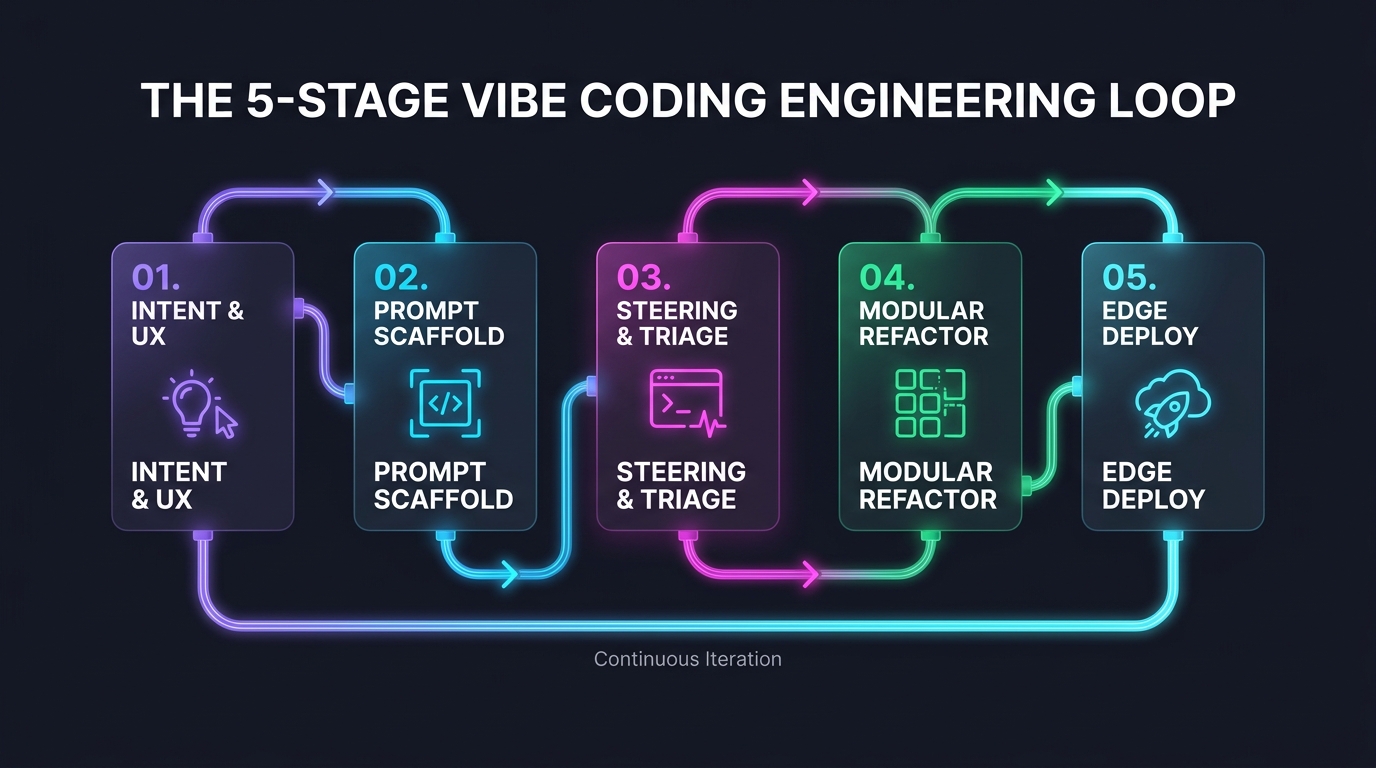
2. The 5-Step Vibe Coding Engineering Loop
Great vibe coders don't just dump a vague prompt like "Build me an Uber clone" and hope for magic. They execute a disciplined, repeatable 5-step feedback loop:
Step 1: Intent & User Experience Framing
Never begin with frameworks, database tables, or tech stacks. Begin with the User Journey. Write down: Who is the user? What is their initial screen? What happens when they click the main CTA button? What data must persist after page reload?
Step 2: Zero-Config Prompt Scaffolding
Feed your intent prompt into an autonomous agent (like Claude Code, Cursor, or Google AI Studio). Instruct it to generate a runnable, zero-dependency Minimum Viable Product (MVP) in under 60 seconds. Test the live preview immediately.
Step 3: Real-Time Conversational Steering (Never Touch the Code)
When something breaks, resist the urge to open the file and edit syntax manually. Instead, copy the exact browser console error or describe the UI glitch back to the agent: "The dark mode toggle in the header switches the background to black, but text contrast remains unreadable. Fix the CSS variables in styles.css."
Step 4: Periodic Modular Refactoring
AI models naturally prefer stuffing everything into a single massive 1,500-line file. Every 3 feature additions, execute a dedicated refactoring turn: "Audit this codebase. Decompose large monolithic blocks into separate modular components and remove dead CSS tokens."
Step 5: One-Click Production Deployment
Ship to edge hosting platforms like Cloudflare Pages, Vercel, or Netlify. Modern vibe-coded projects rely on client-side state (LocalStorage, IndexedDB) or serverless backends (Supabase), eliminating complex server maintenance.
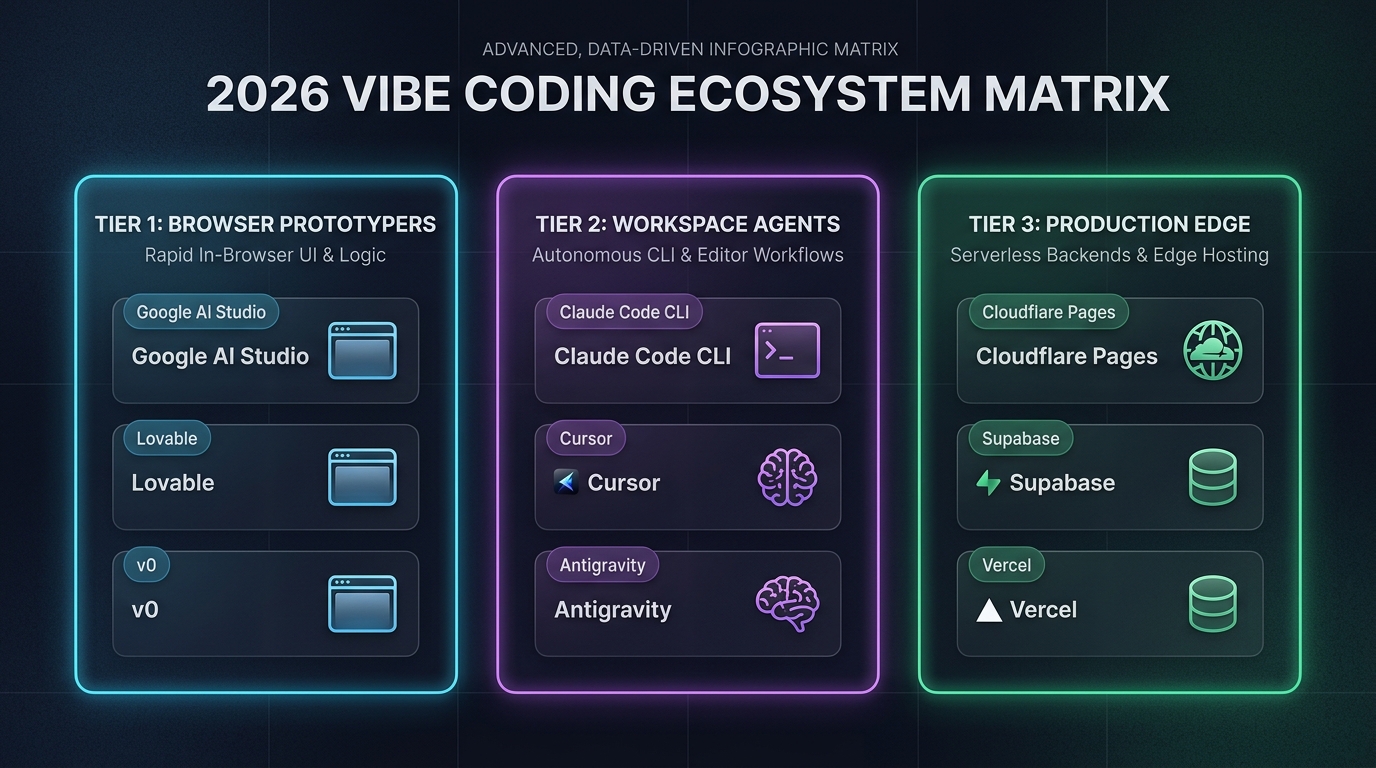
3. The 2026 Vibe Coding Ecosystem & Tool Matrix
Choosing the right tool determines whether vibe coding feels like effortless flying or exhausting debugging. Here is how modern builders divide their stack:
| Tool / Platform | Category | Setup Friction | Best For | Key Limitation |
|---|---|---|---|---|
| Google AI Studio | Browser Sandbox | Zero (Web only) | Instant single-page HTML/JS apps & games | No native multi-file git versioning |
| Claude Code CLI | Terminal Agent | Low (Node.js npm install) | Autonomous multi-file refactoring & bash tasks | Requires comfort with terminal commands |
| Cursor / Windsurf | AI-Native IDE | Medium (Desktop editor) | Deep multi-file codebase indexing & diff review | Can suffer context amnesia without AGENTS.md |
| Lovable / v0 | Full-Stack AI Builder | Zero (Cloud hosted) | Visual UI prototypes & Tailwind components | Subscription costs grow rapidly |
| Cloudflare Pages | Edge Deployment | Low (Wrangler CLI / Git) | Global lightning-fast hosting with zero server costs | Requires static or Workers architecture |
4. End-to-End Walkthrough: Building "FocusPulse" Live
To illustrate how vibe coding works in practice, let’s walk through building a real-world, production-ready web application: FocusPulse—a modern habit tracker with streak counters, dark mode, CSV export, and client-side LocalStorage.
Phase 1: The Foundation Prompt (The Scaffolding)
Open your agent (Claude Code, Cursor, or AI Studio) and paste this foundational intent prompt:
Build a complete, production-ready single-page web app called "FocusPulse".

# Tech Stack:
- Semantic HTML5, clean vanilla CSS with dark mode support, and vanilla JavaScript.
- No heavy external frameworks (no React, no Vue). 100% self-contained.

# Core User Experience:
1. Header: App title "FocusPulse", a streak counter badge, and a dark/light mode toggle.
2. Input Bar: Quick-add input for new habits with a frequency tag (Daily, Weekly) and an "Add Habit" button.
3. Habit List: Cards displaying the habit name, current streak count, a "Done for Today" checkmark button, and a delete button.
4. State Persistence: All habits and streak counts MUST save to browser LocalStorage automatically.
5. Export: A button to export the habit history as a clean CSV file.

Return complete, runnable code in a single index.html file with integrated styles and scripts.
Phase 2: The Real-Time Steering Pass
You test the initial preview. The app works, but you notice two flaws: clicking "Done" allows multiple clicks per day, artificially inflating streaks, and there is no celebratory animation.
Do not write the JavaScript yourself. Simply steer the agent:
The prototype is great! Now refine it with these two strict behaviors:

1. One-Check-Per-Day Lock:
   - Store the timestamp of the last completion date for each habit in LocalStorage.
   - If the habit was already marked "Done" today (based on the local calendar date), disable the button, change its label to "Completed Today ✓", and prevent duplicate streak increments.

2. Haptic/Visual Feedback:
   - When a habit is marked completed, trigger a subtle CSS bounce animation on the streak counter badge and display a green toast notification ("Streak +1! Keep the momentum going!").

Provide the updated code diff.
Phase 3: The Modular Refactoring Turn
Now that the logic is solid, instruct the agent to split the file into maintainable modules before deploying:
Refactor this project into three distinct production files:
1. `index.html` (Semantic markup and accessibility attributes)
2. `styles.css` (CSS variables, responsive layout, dark theme, and micro-animations)
3. `app.js` (Modular state engine with strict LocalStorage schema validation)

Ensure zero functionality is lost during the split.
5. The 4 Cardinal Sins That Break Vibe Coded Projects
When vibe coding fails, it is almost always caused by one of these four mistakes:
❌ Sin 1: The "Manual Coding" Trap
You notice a typo or a broken margin, open app.js, and tweak 10 lines manually. Two turns later, you ask the AI to add a new feature, and it completely overwrites your manual edits. Why? The agent’s mental model depends on conversational instructions. If you change code out-of-band, the agent’s prompt history becomes desynchronized from the actual file state.
❌ Sin 2: The Monolithic 2,500-Line File Trap
Allowing an entire web application to live inside a single massive file. When a file exceeds 1,000 lines, LLMs consume massive token budgets just reading the file, and they begin truncating code or forgetting CSS classes. Enforce modular files early.
❌ Sin 3: Ignoring Negative Guardrails
Failing to tell the AI what not to do. Without negative guardrails, models will casually import heavy npm libraries for simple math, hardcode fake API keys in client-side bundles, or invent imaginary database columns. Always supply clear boundary rules.
❌ Sin 4: Chat Thrashing in 30-Turn Sessions
Continuing to debug a failing feature in the same chat thread after 15 turns. As proven in our guide on why AI forgets instructions, attention dilution causes models to regress after turn 10. Run a compaction checkpoint and restart in a fresh thread!
6. The Vibe Coder's Pre-Flight Checklist
Before opening your IDE or launching your live stream to build an app, verify these 6 points:
- [ ] Single Core Value Proposition: Does your app do ONE thing exceptionally well before adding bells and whistles?
- [ ] Zero-Config Tech Stack: Are you using clean web standards (HTML5/CSS/JS) or proven frameworks (Next.js/Tailwind) without obscure dependencies?
- [ ] External Rulebook Present: Do you have an
AGENTS.mdor.cursorrulesfile in your project root to keep the AI aligned? - [ ] State Architecture Decided: Are you storing data in LocalStorage (client-only), Supabase (PostgreSQL), or a simple JSON file?
- [ ] Error Steer Protocol: Are you prepared to paste raw console errors back to the AI rather than touching code by hand?
- [ ] Prompt Pre-Tested: Have you run your prompt through PromptStaging's free Quality Check Builder to catch edge cases before generation?
🛠️ Essential Tools for Modern Vibe Coders
Supercharge your vibe coding workflow with our zero-data, client-side developer utilities:
7. Frequently Asked Questions
What exactly is vibe coding?
Vibe coding is an AI-augmented software development paradigm where a human acts as the creative director and architect—describing desired user experiences, constraints, and business logic in natural language—while autonomous AI agents generate, test, and refactor the underlying code and file systems.
Can complete beginners build real apps with vibe coding?
Yes. Because modern frontier models handle syntax, DOM manipulation, state management, and API connections, beginners can build functional web applications without prior programming knowledge by focusing on clear feature requirements, user flows, and iterative steering.
Which AI models are best for vibe coding in 2026?
Anthropic Claude 3.7 / Sonnet 4.6 (with extended thinking) and OpenAI GPT-4o are widely considered the benchmark models for multi-file workspace coding and autonomous tool execution, while Google Gemini 2.5 Pro excels at massive context ingestion and full-codebase refactoring.
How do I stop AI from breaking existing features when adding new code?
The key is modular architecture and strict context boundaries. Avoid single giant files; prompt the model to extract reusable modules, enforce regression checks, and supply negative constraints such as "Preserve all existing state logic and function signatures."