How to Stop Your Coding Agent Sending Secrets to the Model with shim-cli
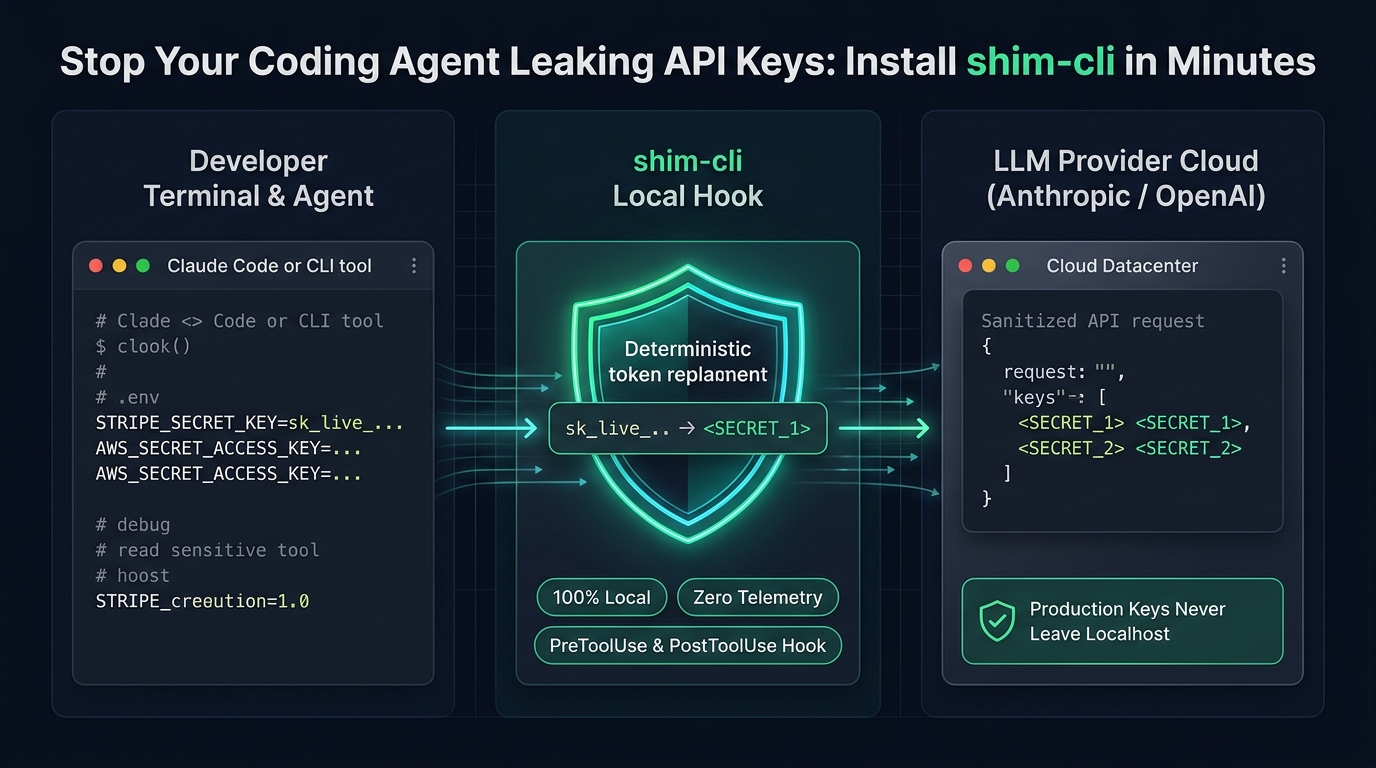
Figure 1: Complete local interception pipeline. shim-cli hooks into Claude Code and Codex tool events, replacing plaintext credentials with deterministic tokens before prompt generation.
⚡ Quick Summary for Engineering Teams
Install the shim package with uv or pipx, then run shim install claude and start a new Claude Code session. Ask Claude to read a test .env file, and the model receives a placeholder such as <SECRET_1> instead of the real key. The same package covers Codex and Copilot CLI with their own install commands, and shim watch measures what a session sent and what it cost. Masking applies to tool results in Claude Code. A prompt you type yourself is reported, not masked, in Claude Code and Codex.
- Zero Cloud Telemetry: Runs 100% locally on your machine with no external network calls or account requirements.
- Tool-Level Interception: Catches files read by the agent (which represent up to 74% of input token context).
- OS Support: macOS and Linux are supported; Windows native support and WSL are not yet verified.
Why this matters now
shim-cli surfaced on Product Hunt in the week of October 18, 2026, when its makers posted the launch and its limits in public. The timing fits a problem that independent tests kept finding through October 2026.
A proxy test published by agyn.io showed that an injected read of a synthetic .env file returned fake AWS, Stripe, and database credentials with no approval prompt in Claude Code, Codex, and OpenCode, because read-only tools are cheap or free by default. A separate study on dev.to ran 202 tests over 8 models and found Claude Code opening a .env file freely when nothing told it not to, with a value slipping through in 6 runs.
The pattern is simple. An agent reads files to do its job, and a file it reads can hold a key. The key then travels to the model inside a tool result, and nothing in the session tells you it happened.
What you need
You need macOS or Linux. shim-cli does not support Windows yet, and running it inside WSL is not yet verified, which matters if your main machine runs Windows.
You need Python 3.10 or newer for the package itself, though uv and pipx can fetch Python 3.12 for you. You need one of the supported clients: Claude Code, Codex CLI, GitHub Copilot CLI, or VS Code with Copilot Chat. The package and the command are both called shim.
Install shim-cli and check it works
Follow this 5-step procedure to set up the interceptor hook and verify that credentials stay strictly on your local machine:
-
Install the package: Run one of these commands. The
--pythonflag matters on a machine whose only Python is the system 3.9, because without it uv quietly installs the last release that ran there, version 0.2.0.uv tool install --python 3.12 --compile-bytecode shimpipx install --python python3.12 --fetch-missing-python shim -
Preview and install the hook: Check what the install will change, then install the hook for Claude Code.
shim install claude --dry-run shim install claude shim doctor claude -
Start a new session: The hook only applies to sessions that start after the install. In Claude Code, run
/hooksand look for shim underUserPromptSubmit,PreToolUse,PostToolUse,PostToolUseFailure,Stop, andSessionEnd. -
Test in a scratch directory: Put a fake key in a
.envfile, for exampleAWS_ACCESS_KEY_ID=AKIAIOSFODNN7EXAMPLE, and ask Claude to read the file. The model should receiveAWS_ACCESS_KEY_ID=<SECRET_1>, and the turn should end with a short summary from shim showing one masked secret. -
Codex and Copilot setup: For Codex, run
shim install codex, then open/hooksin Codex and trust the shim entry. A hook does not run until you trust it, and Codex skips an untrusted hook with no warning. For Copilot CLI, runshim install copilot. There is no trust step, and the next session picks the hook up.
Measure a session with shim watch
shim watch answers a different question from the hook. It puts a local proxy in front of one Claude Code command, forwards every byte unchanged, and reports what went past: where the input tokens went, what the session cost or would cost on an API key, and which sensitive values sat in the request and the response. The proxy binds to loopback, lasts for the length of the command, and writes no request body to disk. Run it like this:
shim watch -- claude
shim watch -- claude -p "explain this repo"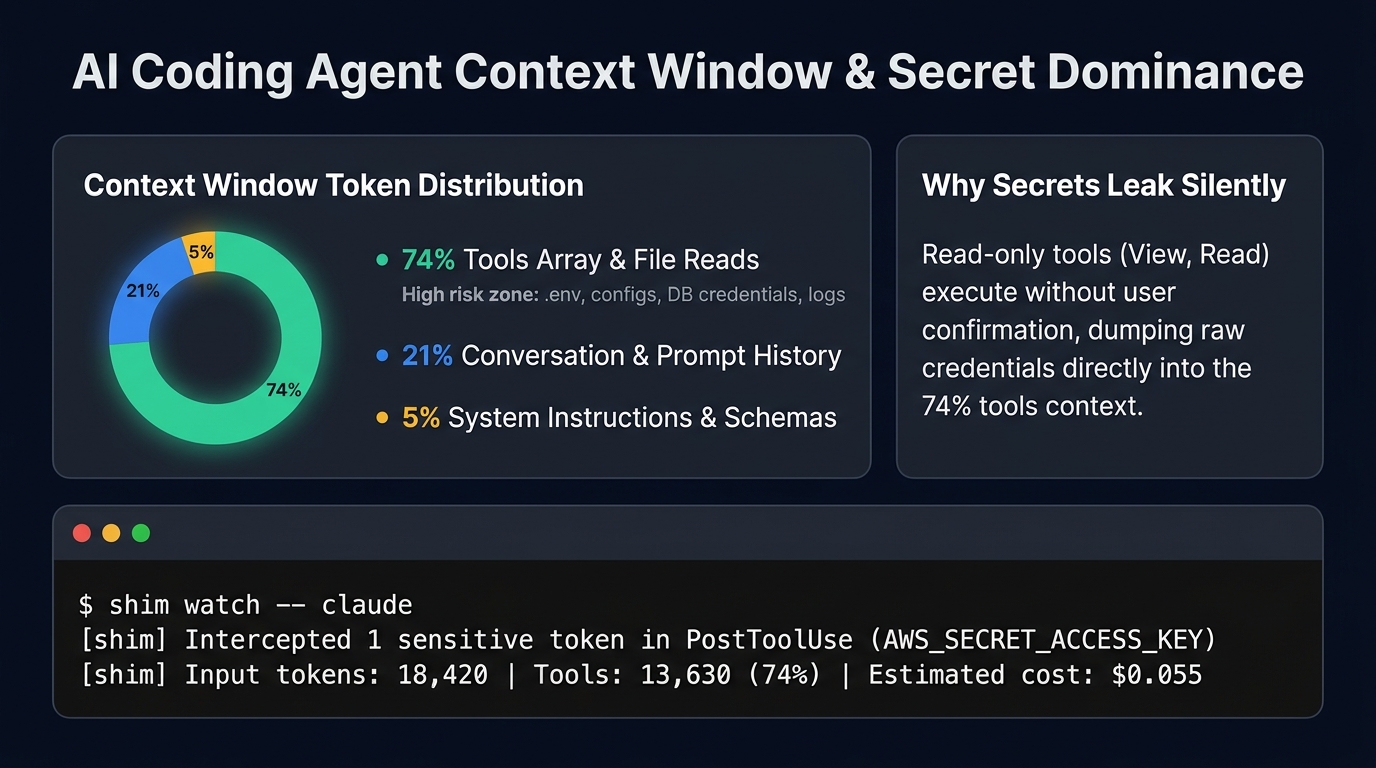
Figure 2: Real-world context analysis via shim watch. File inspection tools dominate the input budget, making unmonitored file reads the primary attack vector for credential leaks.
One example session in the project docs shows the tools array taking 74 percent of input tokens, with the conversation at 21 percent. That split is why a file the agent read can dominate what the model sees. If you sign in with a subscription, the spend line shows what the same traffic would cost on an API key, not a bill.
shim watch supports Claude Code only. Codex and Copilot CLI are out of scope for the proxy, because their endpoint setup would let a session run past it unmeasured.
Audit sessions you already ran
Everything above starts at install, but earlier sessions are already on your disk. Claude Code keeps every session under ~/.claude/projects, and shim audit reads that history and counts what reached the model, by kind, by project, and by how it came in. It prints no value, keeps nothing, and sends nothing.
shim audit
Use shim audit --since 2026-09-01 or shim audit --project ~/work/my-project to narrow it. shim audit --purge deletes the transcripts of sessions that sent something, after you type a confirmation. It cannot take back what the provider already received, so treat it as local cleanup, not as undoing a leak.
What shim-cli cannot do
Read this part before you rely on it. A prompt you type into Claude Code or Codex is reported, not masked, because neither client lets a hook rewrite it. Under enforce mode, shim stops such a prompt instead. Copilot CLI is the exception, and there the model gets the masked prompt.
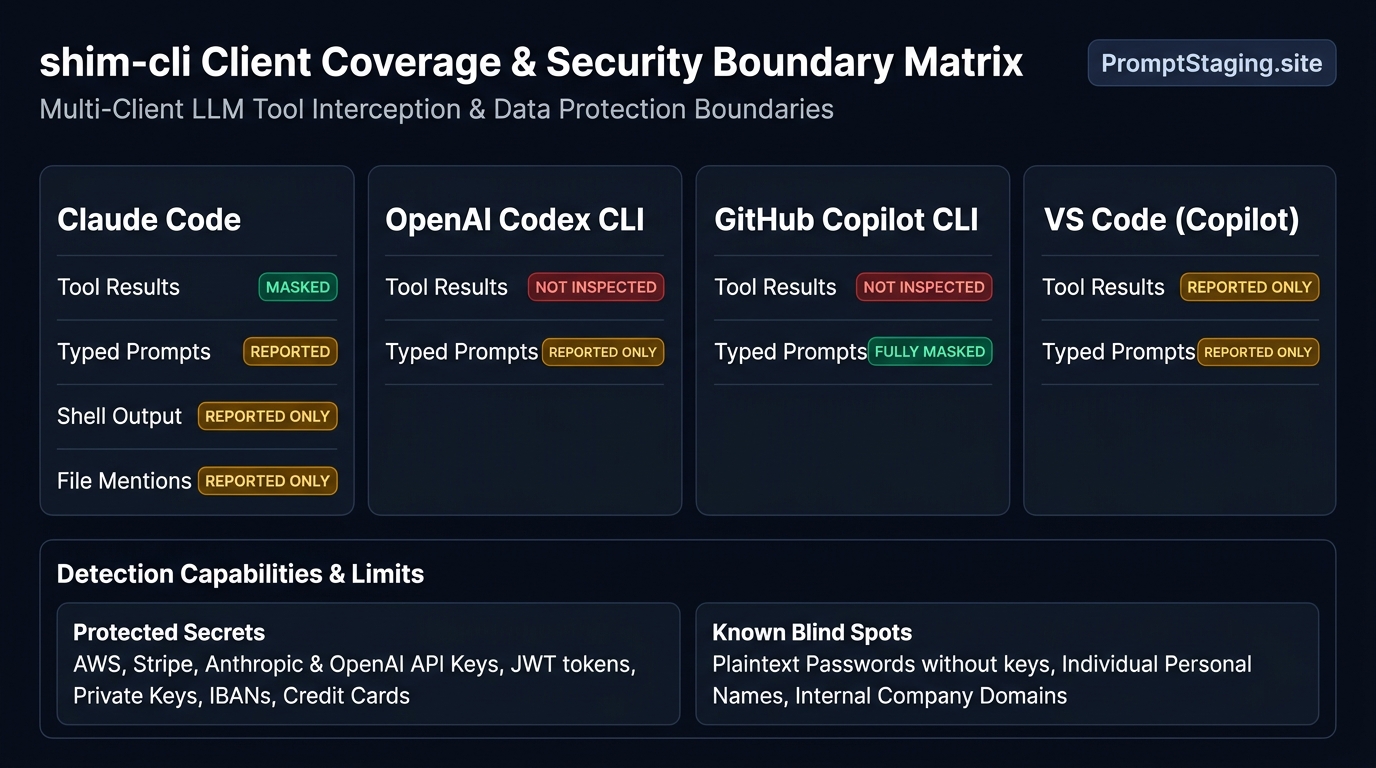
Figure 3: Coverage and boundary matrix across major coding clients. Notice the distinction between tool results and user-typed prompts across frameworks.
| Client Environment | Tool Result Masking | Typed User Prompts | Shell Execution Output | Files Attached with @ |
|---|---|---|---|---|
| Claude Code | Masked (<SECRET_N>) | Reported (Stopped in enforce) | Reported only | Reported only |
| OpenAI Codex CLI | Not inspected | Reported (Needs trusted hook) | Not inspected | Not inspected |
| GitHub Copilot CLI | Not inspected | Masked | Not inspected | Not inspected |
| VS Code (Copilot Chat) | Reported only | Reported (Stopped in enforce) | Reported only | Reported only |
In Claude Code, shell commands, the output of a failed command, and files attached with @ are reported, not masked. Codex and Copilot CLI tool traffic is not inspected at all, and VS Code only reports.
Detection is best effort. It misses person names, postal addresses, and passwords with no key name, and it misses an email at an internal domain. The project states this plainly: shim-cli is a best effort guard, not a data loss prevention boundary. Pair it with the habits that already help, such as keeping real keys out of files the agent reads and adding a short deny rule to your agent instructions file.
What to do if it fails
- Hook missing in session: If
/hooksshows no shim entry, start a new session, because sessions that began before the install never pick the hook up. - Codex skips inspection: If you are on Codex and prompts pass through uninspected, open
/hooksand trust the shim entry, since an untrusted hook is skipped silently. - Missing module error: If the install reports a missing module from an older 0.2.0 hook, run
shim install <client>once per client to rewrite the hook line. - Duplicate hooks detected: If
shim doctorfails with two hooks found, use one install method only, because the marketplace plugin and the command line install register the same hook two ways. - Windows platform limitation: If you are on Windows, there is no supported install yet, so the honest options are a macOS or Linux machine, or waiting for Windows support to land.
Frequently asked questions
Does shim-cli mask the prompt I type?
Does shim-cli send my data anywhere?
Does shim-cli work on Windows?
What kinds of values does it detect?
Can shim-cli clean up secrets that already reached a provider?
Is shim-cli free?
Conclusion
shim-cli closes a gap that is easy to miss: the secrets that reach a model are often not the ones you typed, but the ones your agent read from your own files. Install it, verify it with a test .env file, and run shim audit over your past sessions to see what already went out.
Keep its limits in mind, and treat it as one layer beside careful file hygiene and a short deny rule in your agent instructions. If you also install agent skills, the PromptStaging Agent Skills Directory is a useful place to find skills worth trying, since the same care that applies to secrets applies to the instructions you hand your agent.