The Complete Model Context Protocol (MCP) Blueprint: Connect Claude, Cursor & AI Agents to Enterprise Data
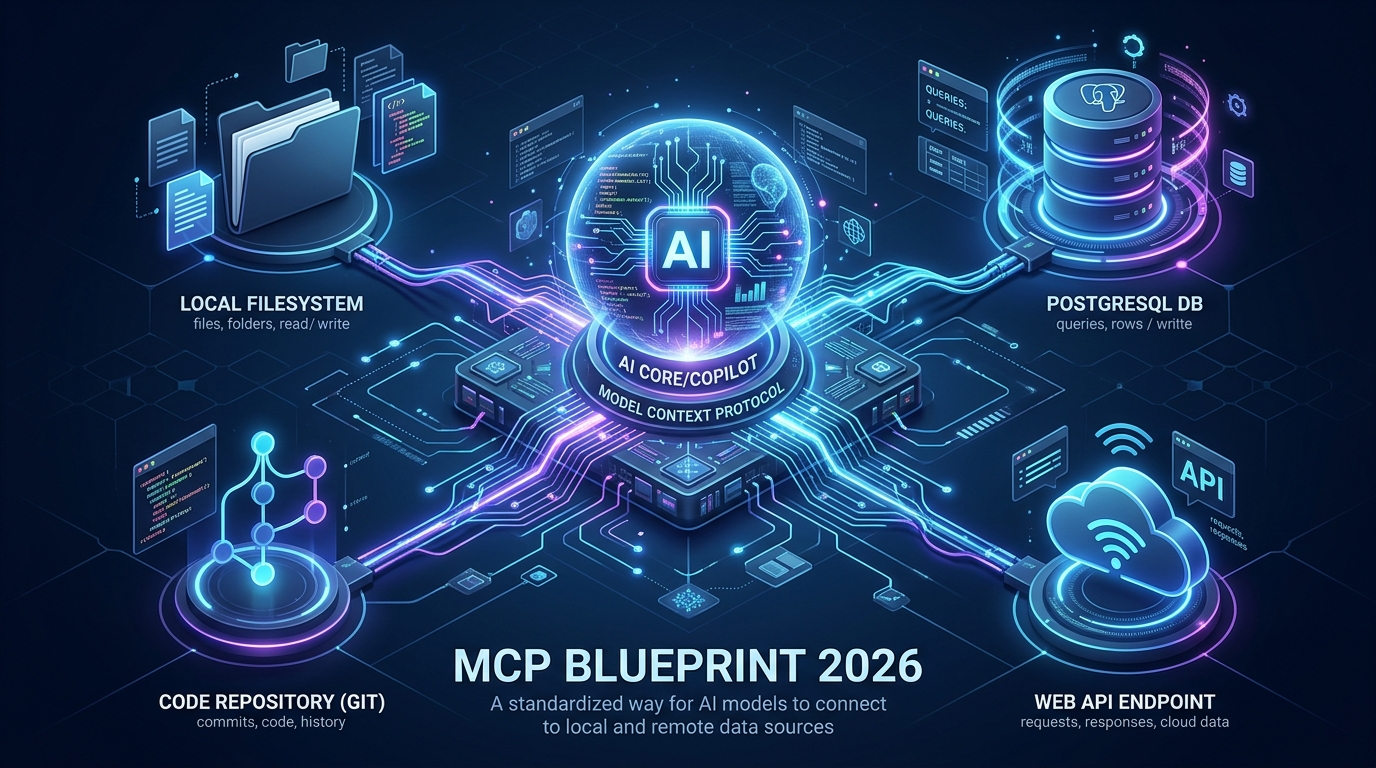
⚡ Executive Summary (The 30-Second Brief)
- The USB-C of AI: MCP replaces custom Python API glue with an open standard (JSON-RPC 2.0 over
stdioorSSE) developed by Anthropic. - Write Once, Run Everywhere: A single MCP server connects seamlessly into Claude Desktop, Cursor IDE, Windsurf, or custom agent frameworks.
- Zero Credential Leaks: By keeping database credentials and file operations on your local machine, the AI model receives query results without accessing raw passwords.
- Instant Interactive Builder: You can assemble validated, tested JSON configs in under 60 seconds with our free MCP Studio Tool.
1. Why MCP is Replacing Brittle API Glue Code
For the past three years, connecting an LLM to enterprise tools was an engineering nightmare. If you wanted Claude to query your production PostgreSQL database and inspect a local Git repository, you had to write custom LangChain agents, configure complex vector databases, or author brittle function-calling scripts that broke with every SDK update.
Every new AI tool required rewriting the exact same integration logic from scratch. In late 2024, Anthropic open-sourced the Model Context Protocol (MCP) to permanently solve this fragmentation. By standardizing how AI applications expose context, tools, and prompts, MCP does for AI copilots what Language Server Protocol (LSP) did for IDE code editors a decade ago.
Instead of building N × M bespoke integrations between N AI clients (Claude, Cursor, Copilot, Antigravity) and M data sources (Postgres, Filesystem, GitHub, Jira), developers build one MCP server that connects universally to any compliant client.
2. The 3-Tier MCP Architecture Explained
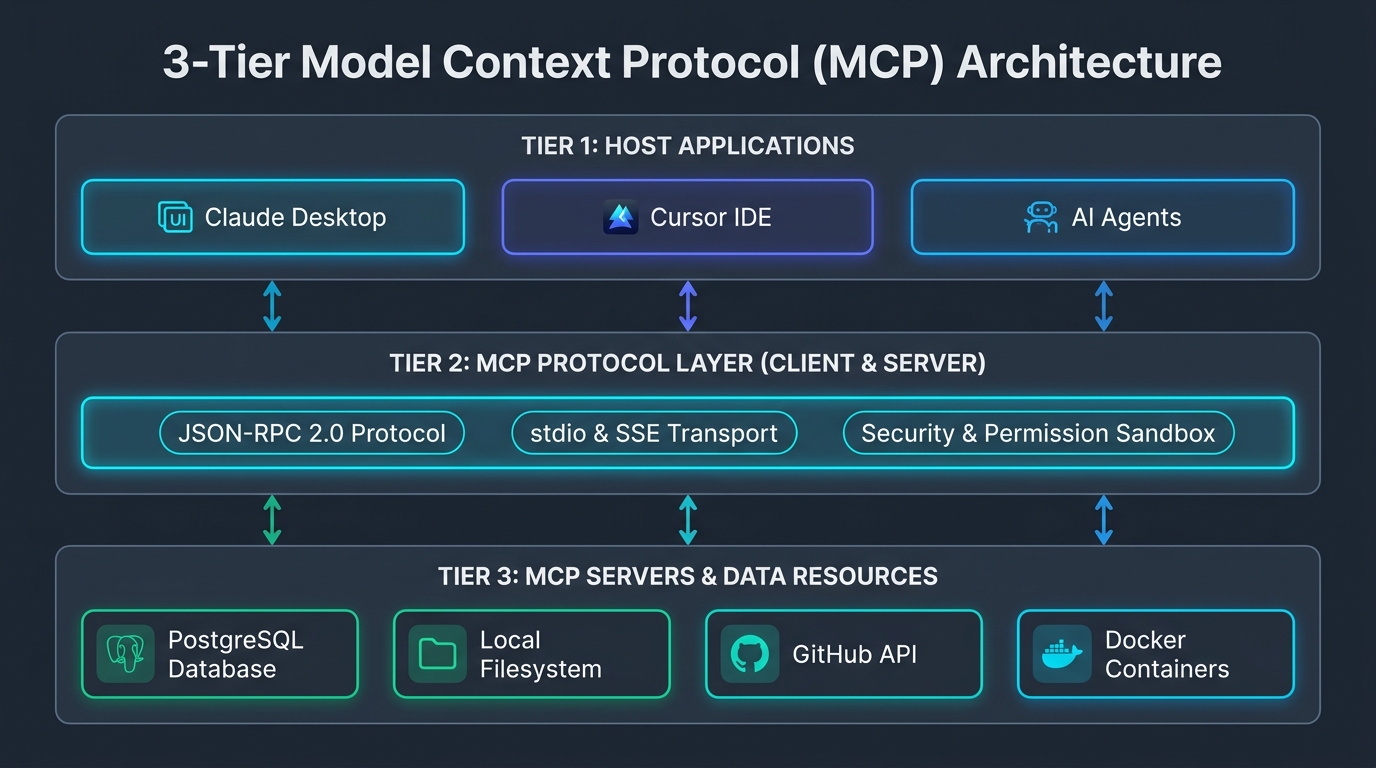
To understand how MCP functions safely in production, you must understand its three distinct architectural layers:
AI Client Application
The program where user conversations occur—such as Claude Desktop, Cursor IDE, or autonomous CLI runners. The Host manages user permissions and decides when to invoke external tools.
JSON-RPC 2.0 Transport
The standardized messaging highway running over standard input/output (stdio) for local CLI utilities or Server-Sent Events (SSE) for remote cloud servers.
Local Tools & Data Gateways
Lightweight programs that expose specific capabilities to the host: running read-only SQL queries, listing directory trees, inspecting Git commits, or performing web searches.
3. Step-by-Step Setup: Claude Desktop
Claude Desktop is currently the primary flagship client for MCP. Here is how to configure your first server in under 2 minutes:
Locating claude_desktop_config.json
Claude Desktop reads its active server configurations from a single JSON file on your machine. Depending on your operating system, locate or create this file:
- Windows:
%APPDATA%\Claude\claude_desktop_config.json - macOS:
~/Library/Application Support/Claude/claude_desktop_config.json - Linux:
~/.config/Claude/claude_desktop_config.json
A Complete, Battle-Tested Configuration
Paste the following validated configuration into your claude_desktop_config.json to enable local filesystem inspection and GitHub repository browsing:
{
  "mcpServers": {
    "filesystem": {
      "command": "npx",
      "args": [
        "-y",
        "@modelcontextprotocol/server-filesystem",
        "C:\\Users\\YourUsername\\Projects"
      ]
    },
    "github": {
      "command": "npx",
      "args": [
        "-y",
        "@modelcontextprotocol/server-github"
      ],
      "env": {
        "GITHUB_PERSONAL_ACCESS_TOKEN": "ghp_yourPersonalAccessTokenHere"
      }
    }
  }
}
After saving the file, restart Claude Desktop. When you start a new conversation, you will notice a small hammer / plug icon in the bottom right corner of the prompt box. Clicking it reveals the active MCP tools ready for queries like: "Inspect the files inside my Projects folder and list all uncommitted git changes."
4. Step-by-Step Setup: Cursor IDE
Cursor IDE natively adopted Model Context Protocol support, allowing developers to equip their AI coding agent with live database inspection and terminal tools directly inside their editor.
Cursor supports two methods for configuring MCP:
- Global User Settings: Navigate to
Cursor Settings > Features > MCPand click "Add New MCP Server". - Project-Level Shared Config (Recommended): Create a file named
.cursor/mcp.jsonat your project root. This file can be committed to Git (excluding raw secret tokens), ensuring every engineer on your team shares identical tooling.
{
  "mcpServers": {
    "postgres": {
      "command": "npx",
      "args": [
        "-y",
        "@modelcontextprotocol/server-postgres",
        "postgresql://postgres:password@localhost:5432/my_app_dev"
      ]
    },
    "sqlite": {
      "command": "npx",
      "args": [
        "-y",
        "@modelcontextprotocol/server-sqlite",
        "./dev.db"
      ]
    }
  }
}
With this configuration active in Cursor, you can open the Composer (`Ctrl + I` or `Cmd + I`) and prompt: "Look at the users table schema in dev.db and write a clean Drizzle ORM migration adding a stripe_customer_id string column." Cursor executes the SQL schema lookup in milliseconds, guaranteeing zero hallucinations regarding column types.
Generate Validated MCP Configs in 60 Seconds
Don't write complex JSON by hand. Assemble 12+ official presets (PostgreSQL, Filesystem, Puppeteer, Brave Search, Supabase) with real-time secret linting using our client-side studio.
5. Enterprise Security: Fencing, Read-Only Guards & Secret Hygiene
Giving an autonomous AI model direct access to your local computer and databases requires strict defense-in-depth engineering. Unfenced MCP servers can accidentally overwrite files, drop database tables, or leak API keys into chat logs.
1. The Read-Only Database Principle
Never connect an MCP server using a database superuser (`postgres` or `root`). Instead, create a dedicated, unprivileged read-only database user specifically for your AI assistant:
-- Create unprivileged role for Claude / Cursor
CREATE ROLE ai_agent_readonly WITH LOGIN PASSWORD 'secure_random_pw_here';

-- Grant connection & schema usage only
GRANT CONNECT ON DATABASE my_production_db TO ai_agent_readonly;
GRANT USAGE ON SCHEMA public TO ai_agent_readonly;

-- Grant SELECT only (strictly forbids INSERT, UPDATE, DELETE, DROP)
GRANT SELECT ON ALL TABLES IN SCHEMA public TO ai_agent_readonly;
ALTER DEFAULT PRIVILEGES IN SCHEMA public GRANT SELECT ON TABLES TO ai_agent_readonly;
2. Scoped Filesystem Fencing
When configuring @modelcontextprotocol/server-filesystem, **never expose your entire root drive** (e.g. C:\ or /). Exposing your root folder allows the model to inspect your SSH private keys (`~/.ssh`), shell history (`~/.bash_history`), and browser cookies. Always constrain paths to specific project subdirectories:
3. Environment Variable Wrappers
Never hardcode raw API tokens (like GitHub Personal Access Tokens or Supabase Service Keys) directly inside shared Git repository configuration files. Always reference local system environment variables or user-level secret managers to avoid committing credentials to public repositories.
Frequently Asked Questions
Real-world answers covering MCP setup, security boundaries, config paths, and custom server development.
The Model Context Protocol (MCP) is the universal "USB-C port for AI." Before MCP, if you wanted an AI assistant to query PostgreSQL, read local Figma files, and create GitHub issues, you had to write custom Python glue code and custom API endpoints for every separate tool.
Anthropic open-sourced MCP in late 2024 to standardize tool calling across the entire AI ecosystem. You install an MCP server once on your computer, and any compliant AI client—including Claude Desktop, Cursor, Antigravity, and Cline—can immediately and safely interact with your tools, databases, and local filesystems without writing bespoke glue code.
MCP servers are registered using a standard JSON configuration format. Here are the exact file locations for each major platform:
- Claude Desktop (Windows):
%APPDATA%\Claude\claude_desktop_config.json(typically located inC:\Users\<YourName>\AppData\Roaming\Claude). - Claude Desktop (macOS):
~/Library/Application Support/Claude/claude_desktop_config.json - Claude Desktop (Linux):
~/.config/Claude/claude_desktop_config.json - Cursor IDE: You can configure MCP servers in Settings > Features > MCP, or commit a repository-level config at
.cursor/mcp.jsonso all team members automatically share identical tools.
Important Note: You must completely restart Claude Desktop or reload the Cursor window (Ctrl+Shift+P > Developer: Reload Window) for newly registered MCP servers to be recognized.
A helpful way to understand the architecture is:
-
Agent Skills (
SKILL.md/.cursorrules): Define behavior and rules. They instruct the AI how to think, which coding style to enforce, which anti-patterns to avoid, and which step-by-step reasoning framework to follow. - MCP Servers: Provide executable capabilities and data. They give the AI the actual tools and sockets to read data and execute actions (querying a database, listing directory contents, sending web requests).
When paired together, an Agent Skill directs the AI to query an MCP server responsibly, preventing hallucinations and ensuring high-quality, reproducible outputs.
No. The Model Context Protocol is 100% free and open-source. The MCP protocol specification and official SDKs are released under the permissive MIT license.
Pre-built MCP servers (such as SQLite, Filesystem, GitHub, and PostgreSQL) execute locally on your machine via Node.js (npx) or Python (uvx). You only pay your standard LLM token costs when interacting with models like Claude 3.7 or GPT-4o, or zero additional cost if connected to self-hosted local models like Ollama.
To safely connect an AI agent to your databases and servers, follow these 3 production security rules:
-
Create Dedicated Read-Only Database Roles: Never give an MCP server superuser or admin credentials. Create a restricted role in PostgreSQL:
CREATE USER mcp_reader WITH PASSWORD 'secure_pass'; GRANT SELECT ON ALL TABLES IN SCHEMA public TO mcp_reader; -
Scope Allowed File Paths: When using the filesystem MCP server, pass only explicit workspace directory paths (e.g.,
["c:/projects/myapp"]) rather than your root drive. -
Store Secrets in Environment Variables: Never check raw passwords into git repository configs. Use the
"env"object in your config to reference system variables like$DB_PASSWORD.
The Model Context Protocol supports two primary communication transports:
- STDIO (Standard Input / Output): The AI client spawns the MCP server as a local child process and exchanges JSON-RPC messages via standard terminal streams (stdin/stdout). This is the default, ultra-fast mode used by Claude Desktop and Cursor for local tools.
- SSE (Server-Sent Events over HTTP): The MCP server runs as an independent web server on your local network or in the cloud. The client connects over HTTP, receiving streaming JSON-RPC events. This is ideal for shared team servers, Docker containers, and remote microservices.
Anthropic provides official high-level SDKs for both TypeScript (@modelcontextprotocol/sdk) and Python (mcp). Building a functional tool takes fewer than 50 lines of code:
import { McpServer } from "@modelcontextprotocol/sdk/server/mcp.js";
import { StdioServerTransport } from "@modelcontextprotocol/sdk/server/stdio.js";
import { z } from "zod";

const server = new McpServer({ name: "currency-converter", version: "1.0.0" });

// Register an executable tool with typed Zod parameters
server.tool(
  "convert_currency",
  { amount: z.number(), from: z.string(), to: z.string() },
  async ({ amount, from, to }) => {
    const rate = 1.08; // Example rate
    return { content: [{ type: "text", text: `${amount} ${from} = ${amount * rate} ${to}` }] };
  }
);

const transport = new StdioServerTransport();
await server.connect(transport);
You can test and generate your own MCP configurations interactively using our free Visual MCP Server Builder.