One SKILL.md, Every Agent: How to Build a Single Agent Skill That Works in Claude Code, Codex, Cursor & Copilot
.agents/skills executes across all major agent runtimes without manual synchronization or syntactic conversion.
💡 Quick Answer: Can One SKILL.md Work Across Every Agent?
Yes — one SKILL.md can run across all agents. Since 22 October 2026, Agent Skills is a vendor-neutral open standard governed by the Linux Foundation's Agentic AI Foundation (AAIF), already adopted across 70+ development platforms. A skill works everywhere if it (1) uses only the spec's standardized frontmatter fields, (2) lives in the shared .agents/skills directory, and (3) is symlinked or junction-mapped into each agent's native directory.
Below is the comprehensive cross-platform directory map, frontmatter compatibility rules, tested Windows/macOS junction commands, and a complete copyable worked skill verified in production.
1. What Changed on 22 October 2026: Agent Skills Got a Neutral Home
On 22 October 2026, Anthropic formally donated the Agent Skills specification — including the name, the format, the open GitHub organization, and the agentskills.io reference website — to the Agentic AI Foundation (AAIF), a directed fund under the Linux Foundation.
The same day, the AAIF also welcomed foundational open-source contributions from other industry leaders: OpenAI's Open Responses, Hugging Face's OpenEnv, and Alibaba's OpenSandbox. Overnight, the foundation expanded from 3 to 10 hosted projects, establishing a unified neutral governance consortium for autonomous software engineering.
What Anthropic Actually Donated — And What It Didn't
It is critical to distinguish between specification governance and asset ownership:
- What was donated: The formal format definition, the parser schemas, the documentation repositories, and the trademark rights. Decisions on future schema versions are now voted on by a vendor-neutral technical steering committee led by maintainers across participating organizations.
- What was NOT donated: Your proprietary workflows and intellectual property. A
SKILL.mdyou author remains your file, hosted in your repository, licensed under whatever terms you choose. You do not need a Linux Foundation membership, an enterprise subscription, or anyone's approval to create or distribute skills.
The Numbers: Why Cross-Platform Portability Is Now the Default
Prior to the donation, software teams hesitated to invest heavily in agent skills out of concern that Anthropic might keep the format proprietary to Claude Code. The numbers reported at the official AAIF handover put an end to that concern:
With native ingestion active across Claude Code, Cursor, Codex, GitHub Copilot, Windsurf, and Gemini CLI, authoring separate prompt files for each IDE is dead. One standard file handles all of them.
What Did NOT Change: Each Agent Still Scans a Different Folder
Here is the critical nuance that product launch press releases gloss over: the file syntax is standardized, but directory paths are not yet unified.
Claude Code looks inside .claude/skills. GitHub Copilot looks inside .github/skills. OpenCode scans .opencode/skills. The official AAIF standard dictates .agents/skills, which Cursor, Codex, and Gemini CLI read natively. Achieving universal portability is fundamentally a file-organization and link architecture problem. Once configured, you never write duplicate rules again.
2. What an Agent Skill Is (The 60-Second Version)
An Agent Skill is a self-contained directory containing a primary SKILL.md file that pairs machine-readable YAML frontmatter with human-readable Markdown instructions, optionally accompanied by modular subdirectories:
.agents/skills/invoice-chaser/
├── SKILL.md          # Frontmatter metadata + procedural steps (mandatory)
├── scripts/          # Deterministic scripts for exact tasks (optional)
│   └── date_calc.py  # Zero-hallucination arithmetic or schema formatters
├── references/       # Dense specifications opened on-demand (optional)
│   └── collections_policy.md
└── assets/           # Output templates and email drafts (optional)
    └── reminder_templates.json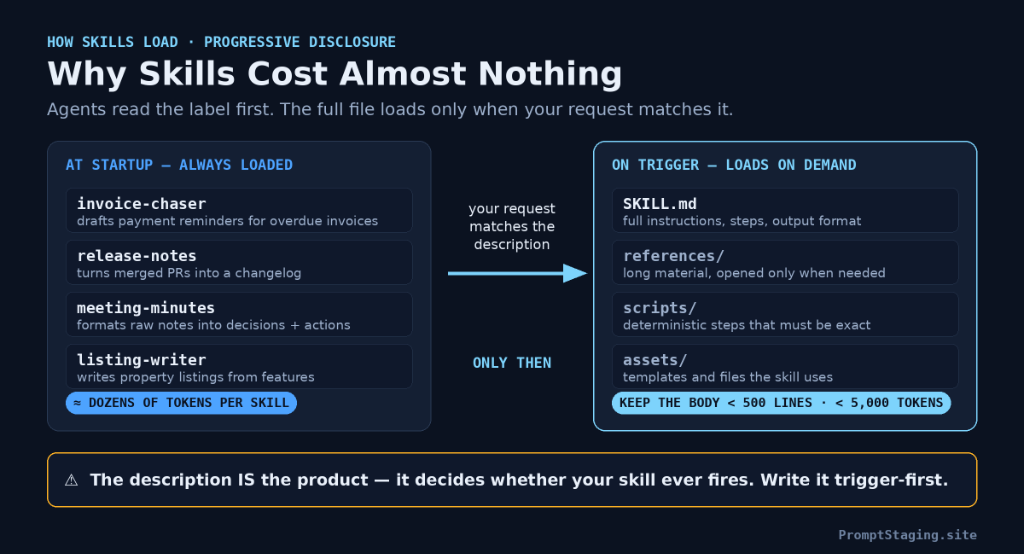
Progressive Disclosure: Why the Description IS the Product
Traditional system prompts suffer from compounding context drag: if you inject 50 procedural guides into every LLM request, you waste 40,000 tokens before the user types a word, triggering severe attention sinks and context drift.
Agent Skills solve this via progressive disclosure:
- At Agent Boot (System Initialization): The agent parses only the
nameanddescriptionof every installed skill. This uses roughly 30–50 tokens per skill. A developer can have 60 skills registered in our Skills Hub while consuming less than 2,500 total tokens of system context. - During Active Conversation: When a user request matches the intent described in the frontmatter, the agent invokes an internal tool to load the complete
SKILL.mdbody into working memory. - During Procedural Execution: Files located in
references/orassets/are loaded solely if the procedural steps explicitly instruct the model to inspect them.
Because agents evaluate your description to decide activation, the description is the entire trigger mechanism. Write it as an activation criteria rather than a passive summary. Crucially, flagship models like Codex budget approximately 2% of their context window for skill descriptions before truncating. Front-load critical action verbs and specific user keywords at the beginning of the field.
3. The Cross-Platform Folder Map & Symlink Architecture
To achieve write-once portability, never maintain disparate copies across .claude, .cursor, and .github. Establish one master canonical directory in .agents/skills, and create filesystem links for legacy tool paths:
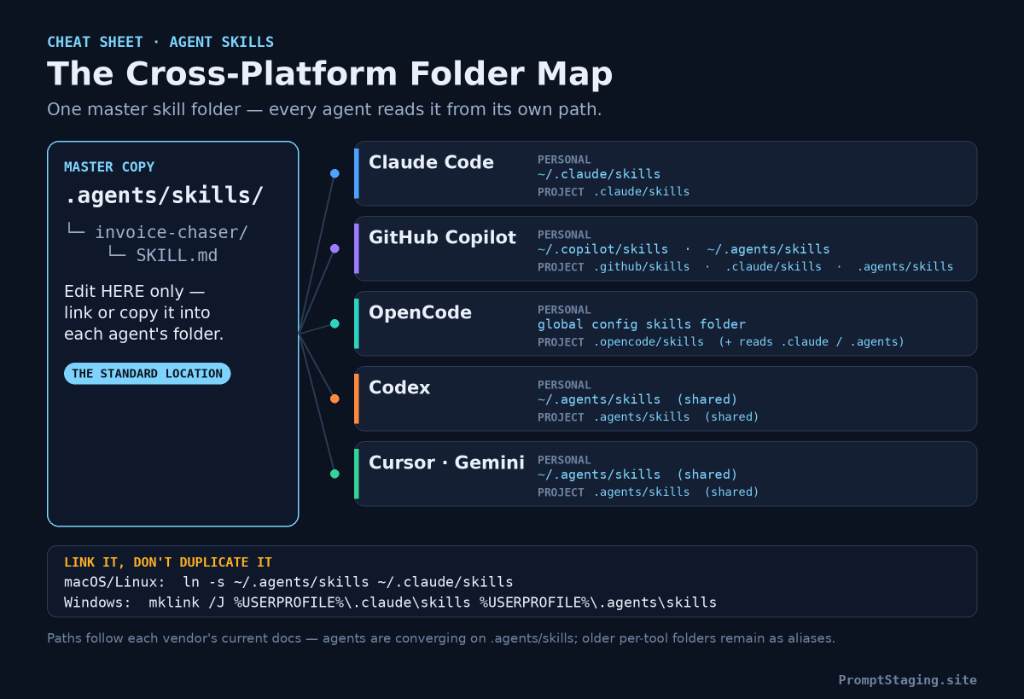
.agents/skills repository.
| Agent / Runtime | Personal Path (Global / User) | Project Path (Repo Root) | Native Ingestion Status |
|---|---|---|---|
| AAIF Shared Standard | ~/.agents/skills/ |
.agents/skills/ |
CANONICAL MASTER |
| Claude Code | ~/.claude/skills/ |
.claude/skills/ |
Symlink from .agents/skills |
| GitHub Copilot | ~/.copilot/skills/ or ~/.agents/skills/ |
.github/skills/, .agents/skills/ |
Reads .agents natively |
| Cursor IDE | ~/.cursor/skills/ |
.agents/skills/ or .cursor/rules/ |
Reads .agents natively |
| Codex / OpenAI | ~/.agents/skills/ |
.agents/skills/ |
Reads .agents natively |
| OpenCode | ~/.config/opencode/skills/ |
.opencode/skills/, .agents/skills/ |
Fallbacks to .claude & .agents |
| Gemini CLI | ~/.gemini/antigravity/skills/ |
.agents/skills/ |
Reads .agents natively |
The Universal Linking Setup (Tested macOS, Linux & Windows)
To prevent divergence, follow this strict protocol: Edit only the master copy in .agents/skills. Then create a filesystem pointer:
On macOS & Linux (Terminal):
# 1. Create your canonical repository
mkdir -p ~/.agents/skills ~/.claude/skills

# 2. Symlink the skill directory from the canon into Claude Code
ln -s ~/.agents/skills/invoice-chaser ~/.claude/skills/invoice-chaser

# For project-level root configurations:
ln -s ../.agents/skills/invoice-chaser .claude/skills/invoice-chaser
On Windows 10 & 11 (Command Prompt / PowerShell):
Standard symbolic links on Windows require Administrator elevation or Windows Developer Mode. However, NTFS Directory Junctions work instantly with standard user permissions:
:: Run in Command Prompt (CMD) as standard user:
mklink /J "%USERPROFILE%\.claude\skills\invoice-chaser" "%USERPROFILE%\.agents\skills\invoice-chaser"

:: Or inside a Git project repository:
mklink /J ".claude\skills\invoice-chaser" ".agents\skills\invoice-chaser"
If utilizing PowerShell, execute the native junction command:
New-Item -ItemType Junction -Path "$env:USERPROFILE\.claude\skills\invoice-chaser" -Target "$env:USERPROFILE\.agents\skills\invoice-chaser"
Once linked, every edit made in .agents/skills/invoice-chaser/SKILL.md is reflected instantly across Claude Code, Cursor, Copilot, and Codex with zero synchronization latency.
4. Build One Skill, Step by Step
You do not need complex frameworks to construct a production skill. You can build, validate, and convert any skill directly inside our browser-based Skill Builder Studio. Here is the engineering logic step-by-step:
Step 1 — Pick a Proven Repeat Task
Never invent a skill from speculative theory. Select a multi-step task you have executed in chat at least twice. If your prompt is still unpolished, generate and structure it inside our Prompt Generator before turning it into a permanent skill.
Step 2 — Author Strict Portable Frontmatter
The official AAIF specification permits only a tight subset of frontmatter attributes. Vendor-specific flags (like custom Claude subagent parameters) will trigger validation errors during upload flows. Stick to the universal standard:
| Field | Portability | Specification Rule & Formatting |
|---|---|---|
name |
✅ Required | 1–64 characters, lowercase alphanumeric and single hyphens. Must exactly match the directory name. |
description |
✅ Required | What it does + exact triggering scenarios. Place keywords and trigger verbs first. |
license |
✅ Standard | SPDX identifier (e.g. MIT, Apache-2.0, or Proprietary). |
compatibility |
✅ Standard | Target environment flags (e.g. node >= 18, python 3.11). |
metadata |
✅ Standard | Arbitrary key-value mappings (author, version, contact). Safe across all tools. |
allowed-tools |
⚠️ Partial | Respected by Claude Code and Cursor; ignored by generic CLI agents. Never rely on it as a security gate. |
Step 3 — Write Concise, Deterministic Instructions
Structure the Markdown body into five distinct semantic blocks:
- When to use: Explicit user intent triggers.
- When NOT to use: Explicit negative boundaries preventing false triggers.
- Required inputs: What data must be present before the model proceeds.
- Execution steps: Chronological, numbered procedural logic.
- Output specification: Exact JSON schemas, markdown formats, or code structures.
The 500-Line Limit: Keep the main SKILL.md strictly under 500 lines (approximately 5,000 tokens). Move lengthy policy documents, contract templates, and massive reference lists into the references/ directory.
Step 4 — Add Scripts Only When One Correct Answer Exists
Do not waste LLM reasoning tokens on math, date formatting, or deterministic file hashing. If an invoice requires calculating exact overdue interest at 1.5% compounding monthly, write a 15-line script in scripts/interest_calc.py. Reserve LLM instructions for qualitative reasoning, tone, and synthesis.
Step 5 — The Complete Worked Example: Invoice Chaser
Unlike developer-only examples that flood GitHub, here is a complete, enterprise-grade skill written for professional finance and operations teams:
---
name: invoice-chaser
description: Draft a polite-but-firm payment reminder for an overdue invoice. Use when the user mentions an unpaid, overdue, or late invoice, a client who hasn't paid, or asks for a payment follow-up email. Not for quotes, receipts, or first invoices.
license: MIT
metadata:
  author: PromptStaging
  version: 1.0.0
---

# Invoice Chaser

## When to Use
- An invoice has passed its agreed net-30 / net-15 payment due date.
- The user asks to draft a reminder, follow-up, or escalation message to an unpaid client.
- **DO NOT USE FOR:** Issuing brand new invoices, quoting new prospective deals, or drafting payment receipts.

## Inputs to Collect (Ask Only If Missing)
1. Client organization name and contact person.
2. Invoice ID number, currency, and gross outstanding amount.
3. Original due date and calculated days overdue.
4. Total count of prior reminders previously delivered.

## Procedural Steps
1. **Determine Tone Stage Based on Days Overdue:**
   - **Stage 1 (1–7 Days Overdue):** Gentle nudge. Assume an administrative oversight or accounts payable processing delay. Maintain warm partnership tone.
   - **Stage 2 (8–21 Days Overdue):** Firm reminder. Reiterate agreed contract terms, reference invoice number and attached statement. Inquire if invoice validation or re-submission is required.
   - **Stage 3 (22+ Days Overdue):** Formal final notice. State the concrete contractual consequence (temporary suspension of services, accrual of standard late interest, or transfer to outside collections) effective exactly 7 days from delivery.
2. **Draft the Communication:**
   - Subject line format: `Payment Reminder: Invoice #[ID] — [Amount] due [Date]`
   - Keep total email length under 120 words.
   - Include clear wire/ACH or digital payment remittance details.
3. **Guardrails & Boundaries:**
   - Never invent statutory penalties or discounts unless the user confirms contract clause availability.
   - Output ONLY the subject line and formatted email body unless the user explicitly asks for strategic commentary.

## Output Format
Subject: Payment Reminder: Invoice #[ID] — [Currency][Amount]

Dear [Contact Name],

[Email Body matching Stage 1, 2, or 3]

Best regards,
[User Name / Accounts Receivable]
You can load this skill directly into our Skill Builder Studio, test alternative parameters, and convert it into Cursor MDC format or Claude Code subagent rules with one click.
5. Test It in Three Agents Before You Ship It
A skill that fails to trigger when needed is worthless; a skill that triggers on every unrelated query is a nuisance. Before publishing any skill to team repositories or the public Skills Directory, execute our standardized 5-Prompt Trigger Test:
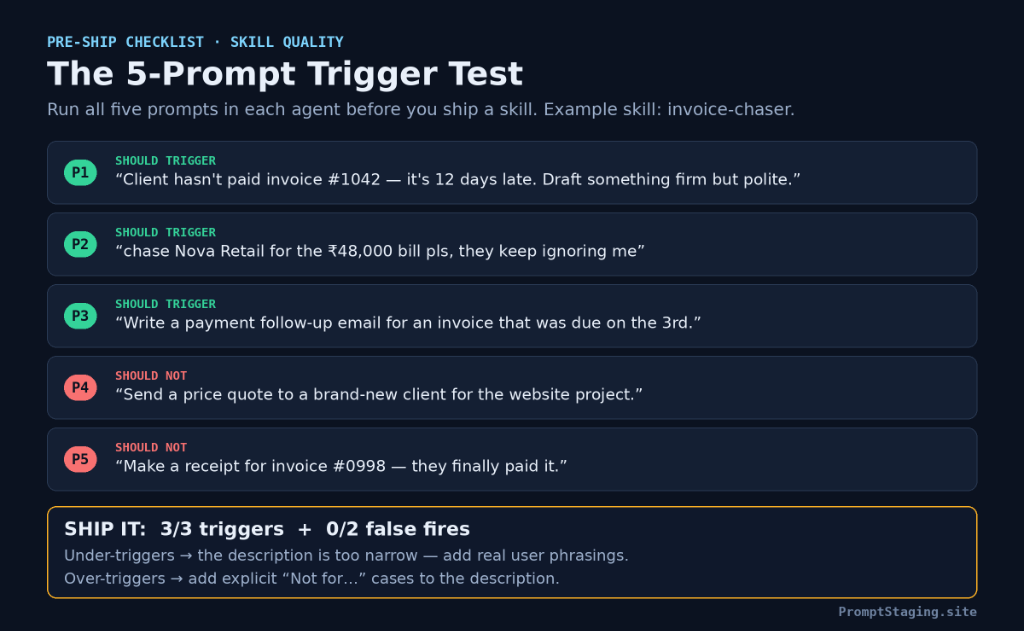
Executing the Verification Matrix
Feed the following five distinct queries into Claude Code, Cursor, and Copilot with your skill installed:
Scoring Rule: To approve the skill for team-wide deployment, you must score 3/3 on positive triggers and 0/2 on false fires across all target agents. If it under-triggers, expand the description keywords; if it over-triggers, add explicit negative boundaries. Run the outputs through our Quality Check Builder to audit formatting consistency.
Scripts contained inside a skill's scripts/ directory execute with your full local terminal permissions and environment variables. Never clone third-party skills from unverified repositories without inspecting every Python, Node, or Bash script inside. Pin skills to committed Git SHA hashes rather than raw branches.
6. Skills vs MCP vs AGENTS.md: Which Layer Is Which?
Developers frequently conflate Agent Skills with Model Context Protocol (MCP) and repository rule files like AGENTS.md. They are not competing alternatives — they are complementary architectural layers:
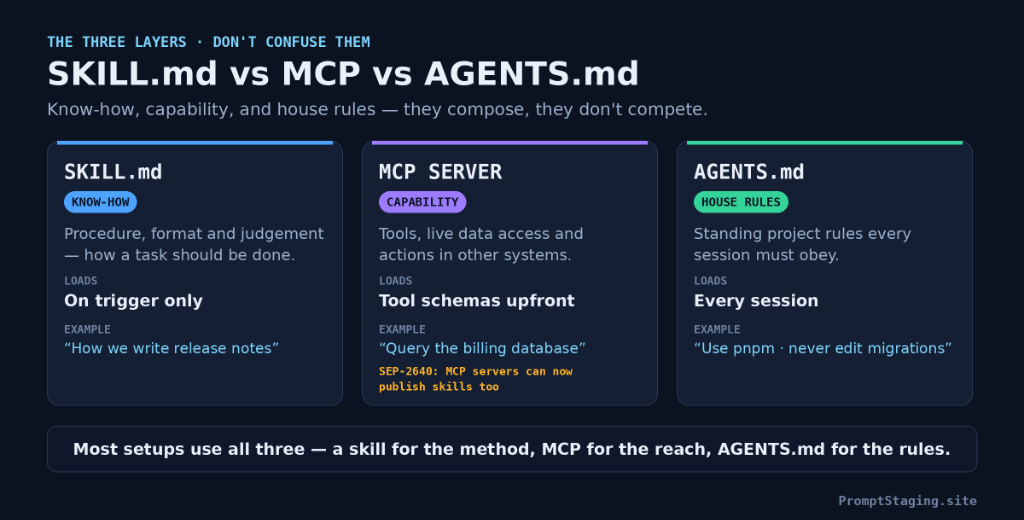
| Layer | Primary Function | Context Loading Timing | Production Example |
|---|---|---|---|
| SKILL.md The Know-How |
Reasoning procedures, formatting specifications, domain judgement rubrics. | On Trigger Only (Zero cost when idle) |
"How to perform forensic general ledger discrepancy triage" |
| MCP Server The Capability |
Live execution tools, database connections, third-party API read/write access. | Tool Schemas Upfront (Deferred search in newer agents) |
"Execute read-only SQL SELECT queries against production PostgreSQL" |
| AGENTS.md The House Rules |
Invariant repository guidelines, architectural rules, test enforcement mandates. | Every Session (Always-on system context) |
"Use pnpm; never edit schema migrations; run Playwright before reporting done" |
The Convergence: MCP SEP-2640 Protocol Extension
In September 2026, the Model Context Protocol working group finalized SEP-2640, enabling MCP servers to publish Agent Skills alongside their tool schemas.
This eliminates the historical disconnect between tools and usage instructions: an enterprise database server can now expose both a query_database executable tool AND a packaged sql-optimization-skill that teaches the model how to construct efficient indexes before running queries. You can build and test both halves inside our MCP Configuration Studio and follow the full tutorial in our Complete MCP Blueprint.
7. Troubleshooting: The 6 Failures Everyone Hits
| Symptom | Root Cause | Engineering Fix |
|---|---|---|
| Skill never triggers | Description reads like a passive essay summary rather than a scenario trigger list. | Rewrite description to start with: "Use when the user mentions [exact user phrases]...". |
| Skill triggers on unrelated queries | Missing negative boundary constraints in frontmatter description. | Add explicit exclusions: "Do NOT trigger for quotes, receipts, or new orders.". |
| Description is truncated by agent | Codex or runtime exceeds the 2% context budget reserved for registry descriptions. | Keep frontmatter description under 160 characters; front-load primary trigger nouns. |
| claude.ai / API rejects file upload | File contains non-standard custom YAML properties in frontmatter. | Strip frontmatter to strictly standard fields (name, description, license, metadata). |
| Skill induces severe latency / token burn | SKILL.md body exceeds 500 lines; massive reference documentation pasted inline. |
Move reference manuals into references/ and instruct agent to inspect on-demand. |
| Edits do not sync on Windows | File was copied manually rather than linked with an NTFS Junction (path drift). | Delete the out-of-sync copy and run mklink /J to map directly to .agents/skills. |
8. Frequently Asked Questions
Does one skill work in Claude Code, Codex and Cursor?
Yes — the Agent Skills format is a shared standard, and all three read SKILL.md files. What differs is the folder each one scans; keep the master in .agents/skills and link or copy it into each agent's folder using the folder map.
Where do I put SKILL.md files?
In a folder named exactly after the skill, inside a skills directory: .agents/skills/<name>/SKILL.md for the shared standard location, .claude/skills/<name>/SKILL.md for Claude Code, and .github/skills/<name>/SKILL.md for Copilot projects. Personal skills live in the matching folders under your home directory.
How long should a SKILL.md be?
Keep the body under 500 lines (about 5,000 tokens). Longer material belongs in references/ files inside the skill folder, which the agent opens only when the task needs them.
Do I need to code to write a skill?
No. A skill is a Markdown file with a small YAML header. Scripts are optional and only worth adding when a step has exactly one correct answer. The invoice-chaser example in this guide is prose only.
Is SKILL.md the same as AGENTS.md?
No. AGENTS.md holds always-on project rules and loads every session. A SKILL.md loads only when a request matches its description — it is on-demand know-how, not standing rules. Most setups use both.
Are Claude Skills and Agent Skills the same thing?
Agent Skills is the open standard Anthropic created and donated to the Linux Foundation's Agentic AI Foundation in October 2026. 'Claude Skills' is Anthropic's implementation of that same standard inside Claude products — skills written to the standard also work in other agents.
9. Start Now: Build & Deploy Your First Skill
You have the folder map, the frontmatter rules, and the verification framework. Take one prompt you or your team re-runs weekly and turn it into a permanent cross-platform skill:
Skill Builder Studio
Generate complete SKILL.md files with validated YAML frontmatter, export to Cursor MDC, and test against edge cases 100% in your browser.
Skills Directory (66 Skills)
Browse 66 production-tested agent skills across software engineering, forensic accounting, legal compliance, and marketing.