Top 10 Self-Hosted AI Coding Copilots to Replace GitHub Copilot in 2026
⚡ Executive Brief (Why Engineers Are Self-Hosting in 2026)
- Parity Has Arrived: Open-weights models (specifically Qwen 2.5 Coder and DeepSeek Coder) now match GPT-4o on standard coding benchmarks while running entirely offline.
- Zero Data Telemetry: Essential for fintech, healthcare, and defense teams bound by strict SOC 2, HIPAA, or air-gapped intranet compliance.
- Zero Rate Limits: No cloud throttling, no "high demand" slowdowns during peak hours, and zero surprise per-seat subscription price hikes.
- Sweet-Spot Hardware: A modern 7B or 14B model runs at 80–100+ tokens/second on an everyday 8GB–16GB Nvidia RTX 40-series GPU or Apple Silicon Mac.
1. The Great Cloud Copilot Backlash: Telemetry, Costs & Intellectual Property
For years, developers accepted the Faustian bargain of cloud AI copilots: pay $10–$20/month per seat, and send every keystroke, open file buffer, and proprietary codebase snippet over the public internet to third-party data centers.
In 2026, enterprise engineering leadership is pulling the plug on cloud copilot telemetry. Three critical drivers have made self-hosted coding models the dominant corporate mandate:
1. Intellectual Property Leaks
Proprietary trading algorithms, health records, and unreleased patents cannot legally touch multi-tenant commercial LLM servers. Self-hosting guarantees 100% air-gapped isolation.
2. FinOps Seat Economics
A 100-person engineering team spends $24,000 to $40,000 annually on SaaS copilot seats. A single dual-GPU local workstation pays for itself in less than 4 months with $0 ongoing fees.
3. Latency & Rate Limits
Cloud APIs throttle users during US peak hours. Local inference runs directly against GPU VRAM via PCIe, clocking tab-completion latency under 45ms.
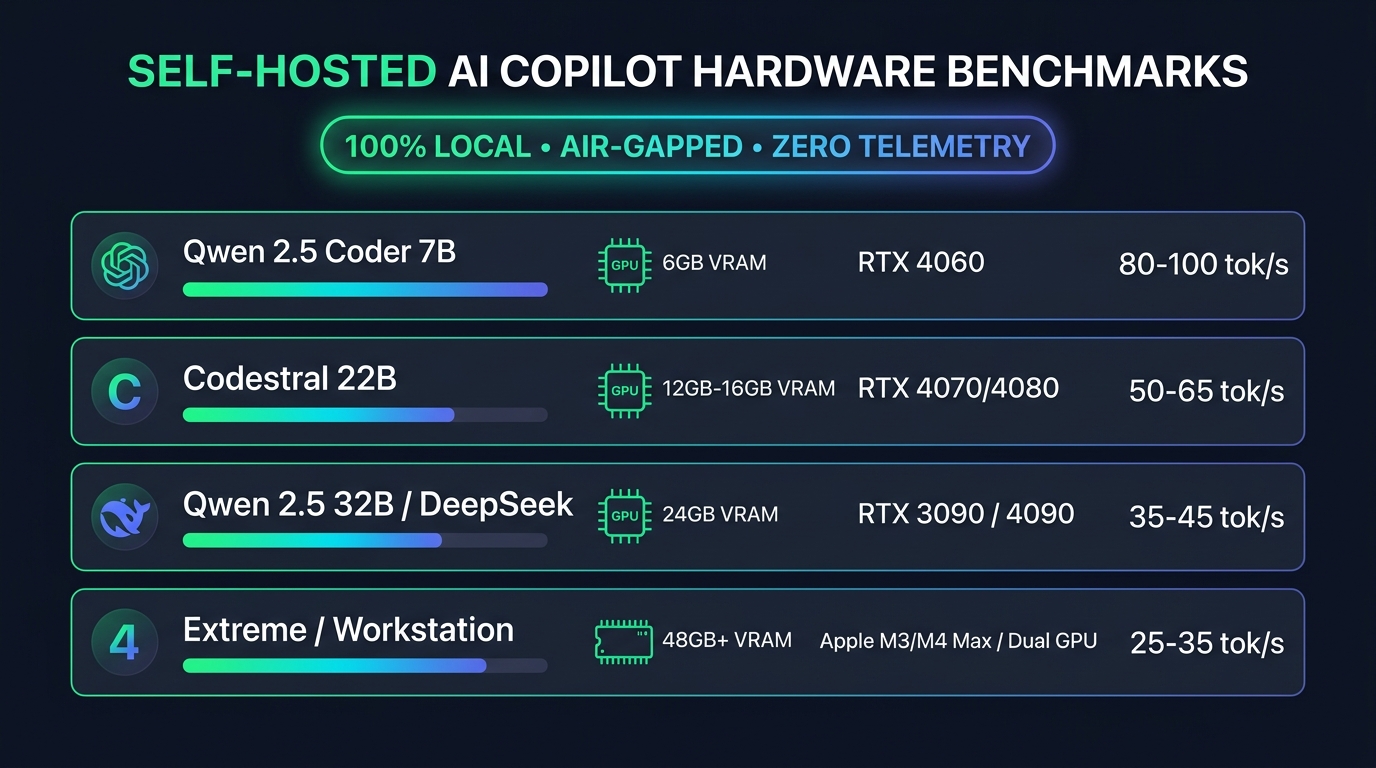
2. Hardware & VRAM Benchmark Matrix (Real 2026 Data)
Running local models effectively requires matching your GPU VRAM to the model's parameter size and quantization level (typically 4-bit Q4_K_M or 8-bit precision):
| Model & Parameter Size | Quantization | Min VRAM | Recommended GPU | Speed (Tok/s) |
|---|---|---|---|---|
| Qwen 2.5 Coder 1.5B | Q4_K_M | ~1.5 GB | Integrated GPU / CPU | 140+ tok/s |
| Qwen 2.5 Coder 7B | Q4_K_M | ~5.2 GB | RTX 3060 / 4060 (8GB) | 85–110 tok/s |
| Qwen 2.5 Coder 14B | Q4_K_M | ~10.5 GB | RTX 4070 Ti / 4080 (16GB) | 45–65 tok/s |
| Codestral 22B | Q4_K_M | ~14.5 GB | RTX 4080 / Apple M3 Pro | 35–50 tok/s |
| Qwen 2.5 Coder 32B | Q4_K_M | ~21.5 GB | RTX 3090 / 4090 (24GB) | 25–35 tok/s |
3. Top 10 Self-Hosted AI Coding Assistants Ranked
1. Tabby (The Gold Standard for On-Premise Teams)
Apache 2.0 • Enterprise ReadyTabby is a fully self-contained, open-source AI coding server built specifically to replace GitHub Copilot. Unlike generic API wrappers, Tabby embeds its own web dashboard, multi-user authentication, and native repository RAG indexing. It integrates directly into GitLab and GitHub to index private repositories and pull requests for true contextual autocomplete.
- Editor Support: VS Code, IntelliJ, NeoVim, Vim.
- Standout Feature: Repository-level RAG indexing that maps your company's internal abstractions.
- Hardware Engines: Native CUDA, ROCm, and Apple Metal support.
2. Continue.dev (Best Single-Developer Desktop Experience)
Most Popular ExtensionContinue is the undisputed leader for developers who want the fluid ergonomics of Cursor inside standard VS Code or JetBrains without proprietary lock-in. It allows you to bind separate models for autocomplete (e.g. fast Qwen 7B) and chat refactoring (e.g. Qwen 32B or DeepSeek Coder).
- Key Commands:
Cmd+I/Ctrl+Ifor inline refactoring,Cmd+Lfor chat context. - Backend Agnostic: Connects to Ollama, LM Studio, vLLM, or custom private enterprise endpoints.
- Zero Telemetry Mode: Complete opt-out from usage logging.
3. Aider (The Terminal-Native Git Pair Programmer)
Git AutonomousAider is a command-line pair programmer that operates directly inside your terminal shell. It edits multiple files across your project tree simultaneously and automatically authors detailed Git commits whenever a test suite passes.
- Zero Code Leaves Machine: Run
aider --model ollama/qwen2.5-coder:14bfor 100% offline development. - Repository Map: Constructs a comprehensive AST graph of your entire repository for deep architectural edits.
4. Cline & Roo Code (Autonomous In-Editor Agent)
MCP SupportedCline (and its popular community fork Roo Code) goes beyond passive completions by running autonomous multi-step software tasks. It can execute bash commands, run automated test suites, fix compilation errors, and interact with local MCP servers.
🔗 GitHub: github.com/cline/cline5. OpenHands (Formerly OpenDevin)
Docker SandboxA web-based autonomous engineering platform that runs in an isolated Docker container. You assign it a GitHub issue, and it clones the repository, reproduces the bug, writes a unit test, fixes the code, and opens a verified Pull Request.
🔗 GitHub: github.com/All-Hands-AI/OpenHands6. Void Editor
An open-source Cursor alternative built as a direct VS Code fork. Native multi-file diff view with 1-click toggling between local Ollama and private cloud endpoints.
7. FauxPilot
An open-source replacement for GitHub Copilot's backend server powered by NVIDIA Triton. Exposes the official Copilot HTTP API protocol so standard extensions connect directly.
8. vLLM High-Speed Backend
The engine powering enterprise multi-user coding assistants. Uses PagedAttention memory management to handle dozens of concurrent developer completions with zero latency drop.
9. Ollama CLI
The easiest desktop backend runner. Download and execute Qwen 2.5 Coder in a single command with GPU acceleration across Windows, Mac, and Linux.
10. LocalAI / LM Studio
Drop-in OpenAI API-compatible local server. Allows you to point any coding extension to http://localhost:1234/v1 with full token streaming.
4. Step-by-Step Setup Across 3 Production Pathways
Depending on whether you are an individual developer wanting fast VS Code completions, a command-line minimalist, or an engineering lead deploying an on-prem server for your team, choose the pathway below:
Pathway A: The Desktop Dual-Model Stack (VS Code & JetBrains)
Recommended for Solo DevsThe secret to making local AI feel as instantaneous as GitHub Copilot is the Dual-Model Architecture. Never use the same model for both chat and tab-autocomplete. Autocomplete fires on every single keystroke and requires sub-50ms latency (1.5B–3B parameter models). Chat and refactoring require deep reasoning (14B–32B parameter models).
Step 1: Install Ollama & Pull the Dual-Model Pair
Open your terminal and pull the lightweight autocomplete model alongside your preferred chat model:
# 1. Pull the lightning-fast autocomplete model (Takes ~1.2 GB VRAM)
ollama pull qwen2.5-coder:1.5b

# 2. Pull the deep reasoning chat/edit model (Takes ~9.5 GB VRAM)
ollama pull qwen2.5-coder:14b
Step 2: Create a Dedicated High-Speed Autocomplete Modelfile
To prevent the Key-Value (KV) cache from bloating your VRAM and causing out-of-memory errors, lock the autocomplete context window to 2,048 tokens:
FROM qwen2.5-coder:1.5b
PARAMETER num_ctx 2048
PARAMETER num_predict 64
PARAMETER temperature 0.1
PARAMETER top_p 0.95
Build this optimized tag in your terminal:
Step 3: Configure Continue.dev (`~/.continue/config.json`)
Install the Continue extension in VS Code or JetBrains, open ~/.continue/config.json, and configure the dual-engine bindings:
{
  "models": [
    {
      "title": "Local Qwen 14B (Chat & Edit)",
      "provider": "ollama",
      "model": "qwen2.5-coder:14b",
      "roles": ["chat", "edit"]
    }
  ],
  "tabAutocompleteModel": {
    "title": "Local Qwen Fast (Autocomplete)",
    "provider": "ollama",
    "model": "qwen-fast",
    "roles": ["autocomplete"]
  },
  "tabAutocompleteOptions": {
    "debounceDelay": 300,
    "maxPromptTokens": 1024
  },
  "allowAnonymousTelemetry": false
}
Step 4: Verify GPU Offloading
Trigger an autocomplete in your editor and execute ollama ps in your terminal. Ensure the PROCESSOR column displays 100% GPU.
Pathway B: The On-Premise Team Server (Tabby + Docker Compose)
Enterprise Air-GappedFor engineering organizations that require centralized authentication, team usage metrics, and automated repository RAG indexing across GitLab/GitHub, Tabby is the battle-tested standard.
Production `docker-compose.yml` with NVIDIA GPU Reservation
version: '3.8'

services:
  tabby:
    image: registry.tabbyml.com/tabbyml/tabby:latest
    container_name: tabby-copilot-server
    restart: unless-stopped
    command: >
      serve
      --model StarCoder-1B
      --chat-model Qwen2.5-Coder-7B-Instruct
      --device cuda
    volumes:
      - "$HOME/.tabby:/data"
    ports:
      - "8080:8080"
    environment:
      - TABBY_WEBSERVER_JWT_TOKEN_SECRET=CHANGE_THIS_TO_A_SECURE_RANDOM_SECRET
    deploy:
      resources:
        reservations:
          devices:
            - driver: nvidia
              count: 1
              capabilities: [gpu]
Launch the server in detached mode: docker compose up -d. Open http://<server-ip>:8080 to create your admin account, connect your private Git repositories for background codebase embedding, and issue team tokens.
Pathway C: The Terminal-Native Git Automator (Aider CLI)
Zero GUI OverheadIf you work in Neovim, Tmux, or SSH terminals, Aider directly connects to your local Ollama daemon, reads your repository AST graph, and commits verified diffs automatically.
# Install Aider via pip
pip install aider-chat

# Launch paired with your local Ollama daemon
OLLAMA_API_BASE=http://localhost:11434 aider --model ollama/qwen2.5-coder:14b --auto-commits
5. The 6 Critical Gotchas & How to Fix Them (Troubleshooting Guide)
Running local LLMs involves navigating low-level GPU memory constraints, context bloat, and tokenizer quirks. Here are the 6 most common failures developers encounter and how to resolve them immediately:
⚠️ Gotcha 1: "Autocomplete Lags by 2–3 Seconds" (KV Cache CPU Spilling)
The Cause: The Key-Value (KV) cache scales linearly with your context window length. When an autocomplete model attempts to allocate 16,000+ tokens of context, the memory requirement exceeds physical VRAM. Ollama quietly spills memory onto your system CPU RAM, causing inference speeds to collapse from 100 tok/s to 3 tok/s.
The Fix: Never use models larger than 1.5B–3B for tab autocomplete. Enforce PARAMETER num_ctx 2048 in your autocomplete Modelfile, and verify with ollama ps that the model is 100% GPU.
⚠️ Gotcha 2: CUDA Out-Of-Memory (OOM) Crashes on Startup
The Cause: Multiple simultaneous generation requests or background GPU processes (like Chrome hardware acceleration or games) fragment VRAM, causing CUDA allocation errors.
The Fix: Set OLLAMA_NUM_PARALLEL=1 in your environment variables to forbid concurrent batch allocations. If running on a shared server, cap global context length via OLLAMA_CONTEXT_LENGTH=4096.
⚠️ Gotcha 3: Bizarre Token Hallucinations (`<|fim_prefix|>`, `<|file_separator|>`)
The Cause: Fill-In-The-Middle (FIM) prompt formatting mismatch. Different model families (Qwen vs StarCoder vs Codestral) use distinct special delimiter tokens to denote prefix, middle, and suffix code context.
The Fix: Always use dedicated coder variants (e.g. qwen2.5-coder rather than generic qwen2.5). In Continue's config.json, ensure the model provider is set to ollama so Continue applies native FIM token templates automatically.
⚠️ Gotcha 4: Connection Refused / Port 11434 Unreachable in WSL2 or Docker
The Cause: By default, Ollama binds strictly to localhost (`127.0.0.1`). When VS Code runs inside WSL2 or remote dev containers, it cannot route traffic to the Windows host daemon.
The Fix: Set system environment variable OLLAMA_HOST=0.0.0.0:11434 and restart the Ollama service to allow subnet connections across WSL and Docker bridges.
⚠️ Gotcha 5: Context Drift & Amnesia Across Large Codebases (>1,000 Lines)
The Cause: Local models lack the massive 200k+ token windows of cloud flagships like Claude 3.7. Pasting entire repositories into chat prompts degrades attention quality (the "Lost in the Middle" phenomenon).
The Fix: Enable Continue's local vector indexer (powered by LanceDB). When asking codebase questions, use the @codebase symbol to perform semantic retrieval over relevant functions only.
⚠️ Gotcha 6: CPU-Only Fallback on Windows/Linux (GPU Completely Ignored)
The Cause: Missing NVIDIA CUDA runtime libraries or outdated GPU display drivers prevent the backend from detecting tensor cores.
The Fix: On Windows, update to NVIDIA Game Ready / Studio Driver 550+. On Linux/Docker, install the nvidia-container-toolkit and verify GPU detection with nvidia-smi before launching containers.
Calculate Your Team's Hardware vs. Cloud API ROI
Determine how many months it takes for local GPU hardware to break even against GitHub Copilot, Claude 3.7 Sonnet, and OpenAI API token bills.
Frequently Asked Questions
Real-world answers covering hardware specifications, VRAM calculations, privacy verification, and common setup errors.
Yes, especially for inline completions and domain-focused development. In benchmark evaluations (HumanEval and SWE-bench Verified), modern open-weights models like Qwen 2.5 Coder 32B score over 88.4%, directly rivaling Claude 3.5 Sonnet and GPT-4o on Python, TypeScript, Go, and Rust tasks.
Furthermore, for inline tab autocomplete (predicting the next 1–5 lines while typing), local models running on dedicated hardware actually outperform cloud APIs in perceived user experience. Cloud copilots introduce 300ms–800ms of internet latency, which can cause subtle typing stutters. A local 7B model running on a consumer GPU responds in under 50 milliseconds at 90+ tokens per second, making tab completion feel instantaneous.
To run open-weights models smoothly with 4-bit quantization (Q4_K_M), plan for roughly 0.65 GB to 0.75 GB of VRAM per billion parameters, plus 1.5 GB overhead for the KV-cache at 8k context:
| Model Class | Min VRAM | Recommended Hardware | Ideal Use Case |
|---|---|---|---|
| 1.5B – 3B | 4 GB | Any CPU / Entry GPU (GTX 1650, M1/M2 Air 8GB) | Ultra-fast single-line autocomplete |
| 7B – 8B | 8 GB | RTX 3060/4060 (8GB/12GB) or Apple M-series (16GB) | Daily driver for autocomplete & chat |
| 14B | 12 – 16 GB | RTX 4070 Ti / 4080 (16GB) or Apple M2/M3 Pro (24GB) | Complex multi-function generation |
| 32B | 24 GB | Single RTX 3090/4090 (24GB) or Apple Max (36GB+) | Full codebase refactoring & test suites |
| 70B+ | 48 GB+ | Dual RTX 3090/4090s or Apple M-series Max/Studio (64GB-128GB) | Enterprise air-gapped engineering hub |
Pro Tip: Apple Silicon Macs (M1/M2/M3/M4) share memory dynamically between CPU and GPU cores, making a 36GB or 64GB MacBook Pro one of the most cost-effective hardware rigs for running large 32B coding models locally.
Connecting a self-hosted model to your IDE takes under 5 minutes through this 3-step setup:
-
Install and run Ollama: Download Ollama from ollama.com. In your terminal, download and run your chosen model:
ollama run qwen2.5-coder:7b -
Install the Continue.dev Extension: Open VS Code or Cursor, go to the Extensions marketplace (
Ctrl+Shift+XorCmd+Shift+X), and install Continue (continue.continue). -
Configure your local model: Open your Continue configuration file (click the gear icon in the Continue sidebar) and set Ollama as your provider:
{
  "models": [
    {
      "title": "Qwen 2.5 Coder 7B",
      "provider": "ollama",
      "model": "qwen2.5-coder:7b",
      "apiBase": "http://localhost:11434"
    }
  ],
  "tabAutocompleteModel": {
    "title": "Qwen 2.5 Coder 1.5B (Tab)",
    "provider": "ollama",
    "model": "qwen2.5-coder:1.5b"
  }
}
Save the file, and your IDE will immediately begin serving AI tab autocompletions and sidebar chat entirely from your local machine.
Yes, when configured properly. Unlike commercial cloud tools that transmit your source code, environment secrets, and developer prompts to remote servers over TLS, tools like Ollama, Tabby, and vLLM execute inference directly in your machine's GPU/VRAM.
To verify this yourself:
- The Airplane Test: Turn off Wi-Fi or unplug your ethernet cable. Type code in your editor; inline completions, docstring generation, and syntax fixes will continue working seamlessly.
- Network Socket Inspection: Run
netstat -ano | findstr 11434(Windows) orlsof -i :11434(Mac/Linux). You will observe that the listening socket binds strictly to127.0.0.1(localhost), with zero outbound internet connections.
For defense contractors, healthcare organizations (HIPAA), and fintech firms, this satisfies strict data residency requirements that forbid cloud AI telemetry.
Each tool serves a distinct role in modern software development:
- Continue.dev: The best client extension. It sits inside VS Code and JetBrains, providing the user interface for autocomplete, codebase indexing, and multi-file editing.
- Ollama: The easiest local runtime engine for solo developers. Handles model downloading, quantization management, and Apple Metal / Nvidia CUDA acceleration out of the box with zero configuration.
- Tabby: The premier self-hosted enterprise solution. Includes a centralized backend with web admin dashboard, team seat management, repository-level RAG indexing across GitHub/GitLab, and audit logging.
- vLLM: The best high-concurrency production server. Uses PagedAttention memory management to serve 20–50 software engineers simultaneously from a single multi-GPU company server with maximum throughput.
Fine-tuning model weights is expensive, slow, and unnecessary for 99% of engineering teams. Instead, modern production teams use dynamic in-context grounding:
-
Agent Skills (
SKILL.md/.cursorrules): Store up-to-date syntax, architectural rules, and negative constraints inside your repository. When you ask the model to generate code, your editor injects the relevant skill into context. - Local Model Context Protocol (MCP) Servers: Connect your local LLM to live filesystem or documentation MCP servers. For example, if React 19 or Next.js 15 updates an API, the MCP server passes the exact current documentation directly into the model's prompt window.
By combining a capable open-weights base model with fresh in-context documentation, your local copilot writes accurate code for libraries that were released yesterday.
Here are the four most frequent issues developers encounter when self-hosting, along with immediate fixes:
-
Gotcha 1: Out of Memory (CUDA OOM) Crash: Happens when the model size plus context buffer exceeds your VRAM.
Fix: Use a smaller quantization level (e.g., switch fromQ8_0toQ4_K_M), or reduce the context window in your config from 32,768 tokens to 16,384 tokens. -
Gotcha 2: First Generation Has a 5-Second Delay: Happens when the model gets unloaded from RAM after a period of inactivity.
Fix: Set the environment variableOLLAMA_KEEP_ALIVE=24hso the model stays permanently warm in memory. -
Gotcha 3: Completions Run at 2 Tokens Per Second: Happens when the model fails to offload layers to the GPU and falls back to CPU execution.
Fix: Check your GPU drivers and runollama psin terminal to verify that 100% of model layers are loaded into GPU VRAM rather than system RAM. -
Gotcha 4: Hallucinated Function Arguments: Happens when using high temperature settings meant for creative writing.
Fix: Set your code completion temperature to0.1or0.2for deterministic, syntax-accurate outputs.